Showing posts with label Cloudera Manager. Show all posts

Cannot Login to Cloudera Manager with LDAP/LDAPS Enabled

Summary

After changing ‘Authentication Backend Order’ to external, users cannot login. This guide explains how to revert back to default behaviour, authenticating through database first.

Symptoms

Users cannot login to Cloudera Manager

Conditions

Cloudera Manager boots up

Login page accessible through the browser

External authentication is enabled (LDAP, LDAP with TLS = LDAPS)

Authentication Backend Order, was changed to external authentication.

Cause

Cloudera Manager is trying to connect to LDAP If auth_backend_order is set to external only or external and DB. A misconfiguration with LDAP or External authentication is causing Cloudera Manager Server to unable to map users credential appropriately.

Instructions

Please follow the instructions to fix this.

Note: Take backup of the SCM database [0]

By deleting auth_backend_order order config Cloudera Manager falls back to the DB_ONLY auth backend and will not try to connect to the LDAP server.

Step 1: 

Stop the Cloudera Manager server

$sudo service cloudera-scm-server stop

Confirm the auth_backend_order is other than non-default ie: not DB_ONLY or nothing.


Step – 2:

Run this query in the Cloudera Manager schema to reset the Authentication Backend Order configuration:

Connect mysql DB: 

./mysql -u root -p

mysql>use scm;

mysql> select ATTR, VALUE from CONFIGS where ATTR = “auth_backend_order”;

Delete the auth_backend_order attribute from Cloudera Manager database (this will revert to default behavior). Run below query in the Cloudera Manager schema to reset the Authentication Backend Order configuration:

mysql> delete from CONFIGS where ATTR = “auth_backend_order” and SERVICE_ID is null;


Step – 3:

Start the Cloudera Manager server

$sudo service cloudera-scm-server start


Try to login now with admin user.


Reference

https://www.devopsbaba.com/cannot-login-to-cloudera-manager-with-ldap-ldaps-enabled/

Cloudera Manager - Got error java.io.IOException: NameNode is not formatted, but no option to format the name node

Issue: Failed to start Name Server for HDFS. with the following error "java.io.IOException: NameNode is not formatted." 

2017-07-03 00:14:56,117 ERROR org.apache.hadoop.hdfs.server.namenode.NameNode: Failed to start namenode.
java.io.IOException: NameNode is not formatted.
at org.apache.hadoop.hdfs.server.namenode.FSImage.recoverTransitionRead(FSImage.java:222)
at org.apache.hadoop.hdfs.server.namenode.FSNamesystem.loadFSImage(FSNamesystem.java:1096)
at org.apache.hadoop.hdfs.server.namenode.FSNamesystem.loadFromDisk(FSNamesystem.java:780)
at org.apache.hadoop.hdfs.server.namenode.NameNode.loadNamesystem(NameNode.java:614)
at org.apache.hadoop.hdfs.server.namenode.NameNode.initialize(NameNode.java:676)
at org.apache.hadoop.hdfs.server.namenode.NameNode.(NameNode.java:844)
at org.apache.hadoop.hdfs.server.namenode.NameNode.(NameNode.java:823)
at org.apache.hadoop.hdfs.server.namenode.NameNode.createNameNode(NameNode.java:1547)
at org.apache.hadoop.hdfs.server.namenode.NameNode.main(NameNode.java:1615)


Resolution: 
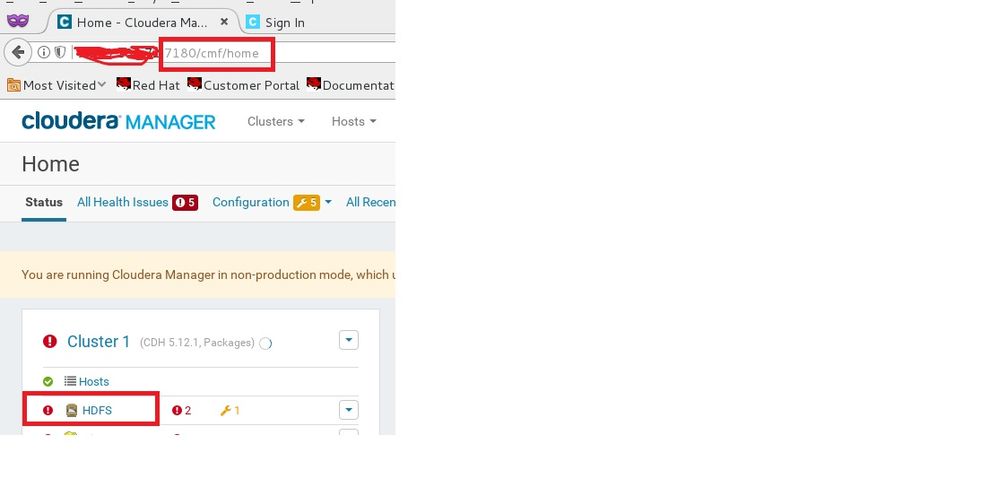
1. From Cloudera Manager HOME, select the 'HDFS'.
Cloudera Manager Home.jpg
2. Once inside the HDFS home page, click on 'Instances' menu.
HDFS - home Page.jpg
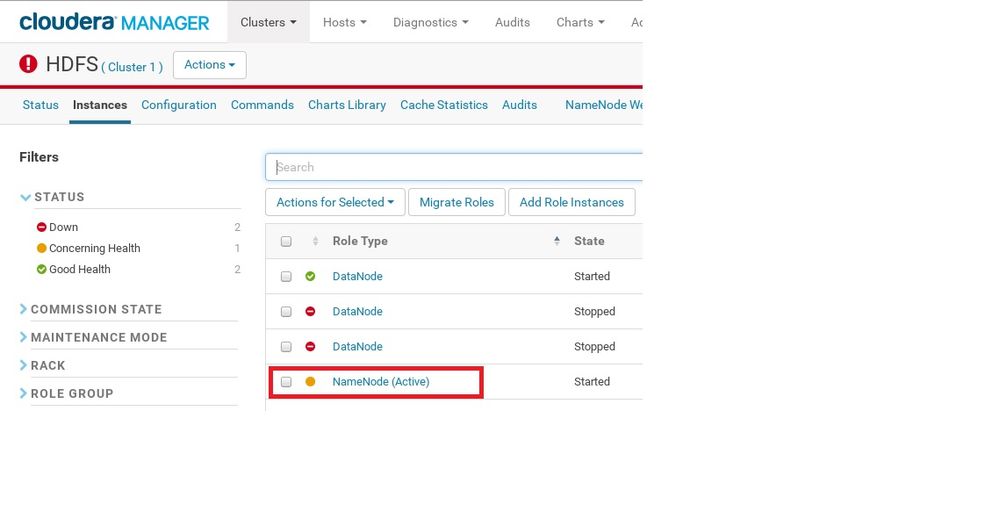
3. Once the instances that make up the HDFS component of the CDH are listed, click on the Role Type 'NameNode'. We do NOT have to select 'NameNode', using the check box (this is what i was doing initially), but just click on the 'NameNode' itself.
NameNode - Selection.jpg
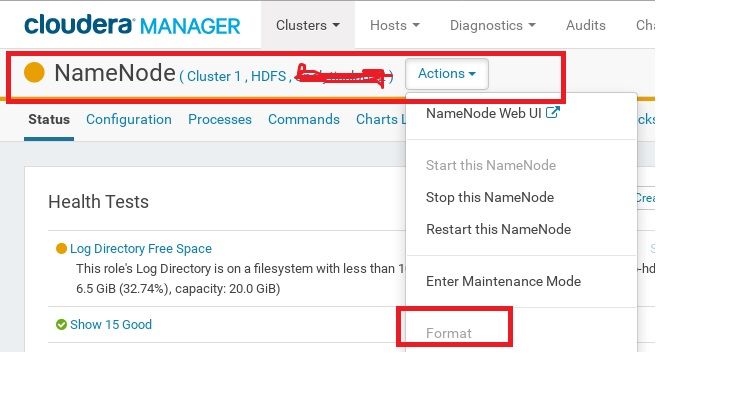
4. Once the NameNode instance's page comes up, select the 'Action' menu to find the 'FORMAT' option!.
NameNode _ Format Option.jpg
Click on it to perform the format of the 'NameNode'.